The Best Website Analytics Tool (2026): GA4, and the 14 Month Catch.
The best website analytics tool is GA4, free at any traffic level. But free GA4 deletes user-level data after 14 months, which is where Plausible at $9/mo wins.
- The pick: GA4. Free at any traffic level, no pageview cap, and the only option that reports Google Ads, Search Console and YouTube into 1 property.
- The catch: a free GA4 property retains user and event level data for 2 or 14 months. Nothing longer. 26 months exists only on Analytics 360, which is quoted, not listed.
- Do this on day 1: set retention to 14 months. It is not retroactive, so setting it in month 13 does not bring the first year back.
- The exception: Plausible, $9/mo at 10k pageviews with 3 years of retention, $14 for 3 sites, $19 for 10 sites and 5 years. 30 day trial, no card.
- Free companion: Cloudflare Web Analytics, free on every plan, no cookies, so no consent banner needed for it.
- PostHog is free to 1 million events a month, then $0.00005 an event, but it is product analytics. Different job.
- Fathom's pricing page opens at $45/mo for 500,000 pageviews. At small traffic Plausible is the cheaper of the 2.
Free analytics has an expiry date and nobody reads it
GA4 is free at any traffic level. No pageview slider, no upgrade nag at 100,000 visits, no per seat charge for the person you added last week. For a solo founder that is genuinely the end of the pricing conversation.
The bill still arrives. It arrives as deleted data.
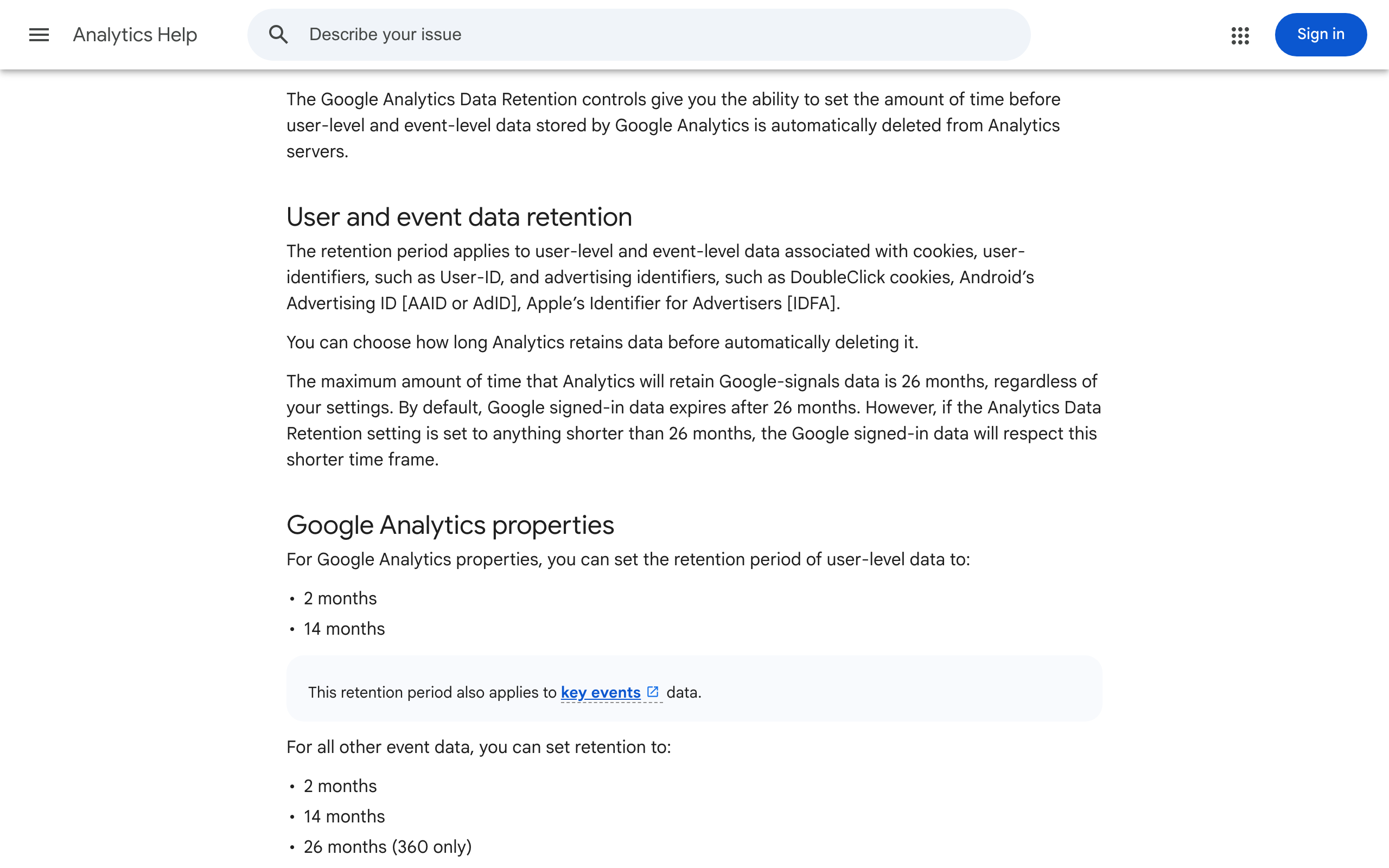
In a standard, free GA4 property you choose how long user level and event level data is kept, and the choice is 2 months or 14 months. That is the entire menu. 26 months exists, and it is marked 360 only, meaning Analytics 360, the enterprise tier Google quotes rather than lists. So the year over year read you will badly want in month 15 is not slow to build, it is not there, because the rows it would have been built from were deleted on schedule.
Worth being precise about what expires, because the panic version of this claim is wrong. Your standard reports keep working over long date ranges: traffic by month, channel, landing page, all fine. What gets deleted is the user and event level detail underneath, which is what every Exploration, path analysis and custom segment actually runs on. The difference is between "how much traffic did I get last August" (still answerable) and "show me what those visitors did next" (gone).
The fix takes 15 seconds and is the single highest value thing in this article. Admin, then Data collection and modification, then Data retention, set user and event data to 14 months, save. It is not retroactive. Change it in month 13 and you have already lost month 1.
GA4 is still the pick, and free is not the main reason
If free were the reason, Cloudflare Web Analytics would win and this would be a short page. GA4 is the pick because of what it is wired into.
Run a Google ad and the path from that click through to the purchase is reconstructed in GA4 and nowhere else on this page. Same for Search Console: the queries people typed before they landed, reported next to what they did after. Same for YouTube, if a channel feeds your site. Every one of those is a Google product reporting into a Google property, and no privacy first competitor is going to be granted that pipe.
The second reason is the escape hatch from the retention problem. A free property can export raw event data to BigQuery, up to 1 million events a day, and those rows are yours once they land. If your site is small that limit is not a limit, and it turns a 14 month memory into a permanent one for the cost of a warehouse you were probably not going to fill anyway. (Most people reading this will not set this up, which is fine, but it is the honest answer to "is 14 months a deal breaker": only if you refuse the export.)
Now the parts that cost you something other than money. The interface is not loved and the learning curve is real. Worse, GA4 measures almost nothing useful until you configure key events, so a fresh install answers "how many people" and shrugs at "how many bought". The free property also caps a few things: Explorations sample at 10 million events per query, 200,000 API tokens a day, 50 event scoped custom dimensions, 30 key events. Solo sites do not hit any of those. The wall you hit is the 14 months.
| Tool | Price | What it actually is | Who it's for |
|---|---|---|---|
| GA4 | Free at any traffic level | The reporting layer for the whole Google world. Ads, Search Console, YouTube, BigQuery. | Anyone who runs ads, or might |
| Plausible | $9/mo at 10k views; $14 for 3 sites; $19 for 10 | One screen of numbers, no cookies, 3 years of retention on the cheapest plan. | Content sites that will never run an ad |
| Cloudflare Web Analytics | Free on every plan | Traffic counts from the dashboard already serving your site. No DNS change, no cookies. | A second free read, or a brochure site |
| Fathom | $45/mo at 500,000 pageviews, 7 day trial | Plausible's closest rival. Same job, priced for bigger sites. | Sites already past 100k views a month |
| PostHog | Free to 1M events/mo, then $0.00005/event | Product analytics. Session replay, funnels, feature flags. | Apps with logged in users, not blogs |
| Umami | Free if you self-host it | Open source Plausible, running on your own box. | People who enjoy running their own box |

The first 10 minutes, in the order that matters
Most GA4 installs are a script tag and then nothing for 2 years. Here is the whole setup, and it is 5 steps.
1. Retention to 14 months. Before anything else. It is the only setting on this list that quietly loses you something while you wait.
2. Turn on the BigQuery export if you expect to care about year 2. Free tier, 1 million events a day, and it is the difference between renting your history and owning it.
3. Mark 2 or 3 key events. Not 20. Purchase, signup, and the 1 outbound click that means something. A property with 20 key events has none, because nothing stands out in the report.
4. Handle consent properly if you serve Europe. GA4 sets cookies, so the moment you install it you owe visitors a banner. The trap is picking 1 global default: deny everyone and you throw away most of your data for no legal benefit, accept everyone and you are offside in the UK and the EEA. The region split default and the exact prompt that gets it right first time are written out in how to build a website without a builder, including the bug where someone clicks Decline and tracking stays on anyway.
5. Do not install a second analytics tool yet. Two dashboards that disagree by 12% is not more insight, it is a new argument with yourself. Get 1 answering questions first.
Plausible is the 1 real exception, and $9 buys memory
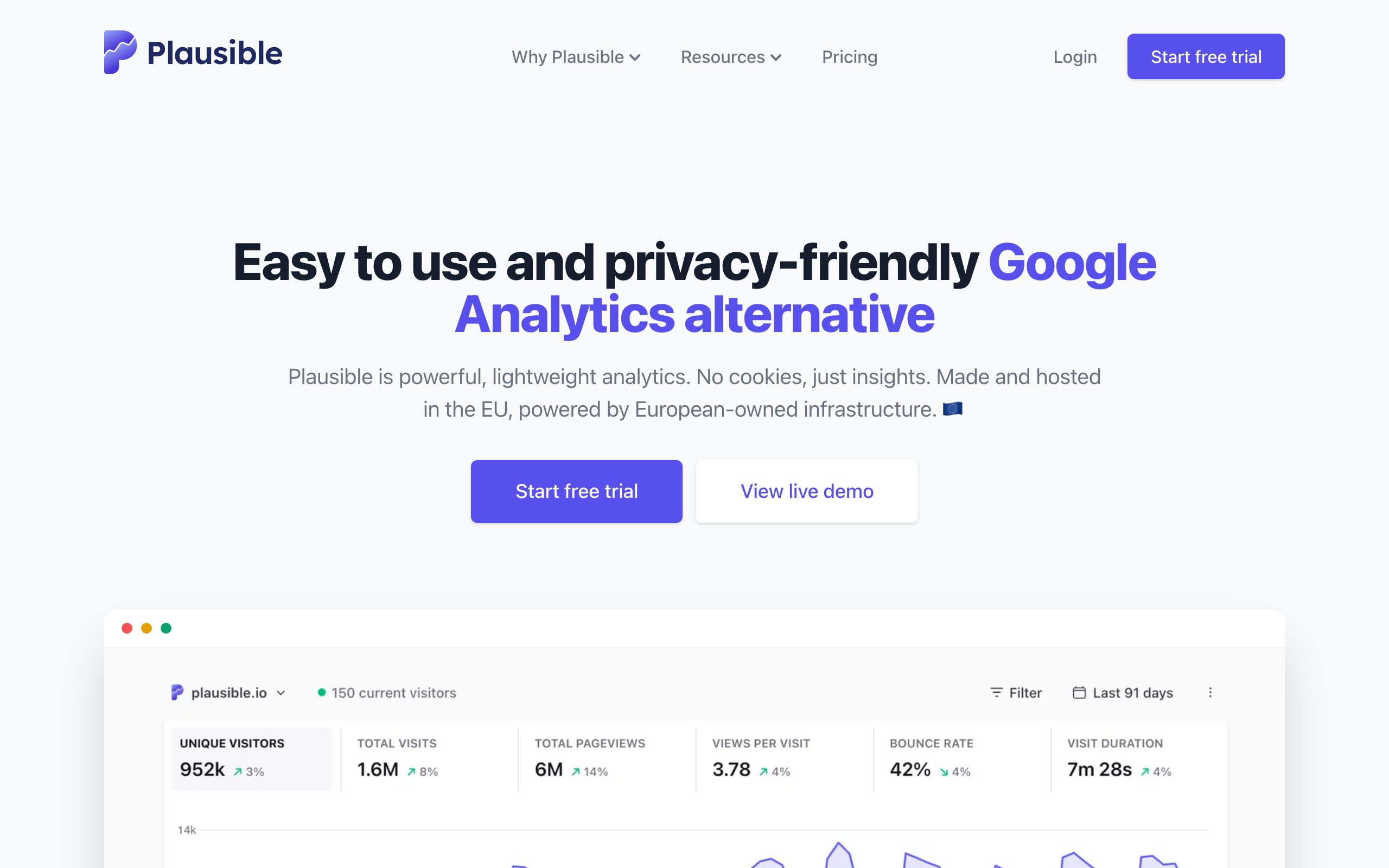
Plausible is the alternative in the stack for a reason, and the usual case made for it is the boring half of the truth. Yes, it is 1 screen: visitors, sources, top pages, bounce, and you have read it before the GA4 tab has finished loading. Yes, the script is under 1KB. Yes, it sets no cookies, which means no consent banner for it at all, which for a lot of small sites removes an entire afternoon of work.
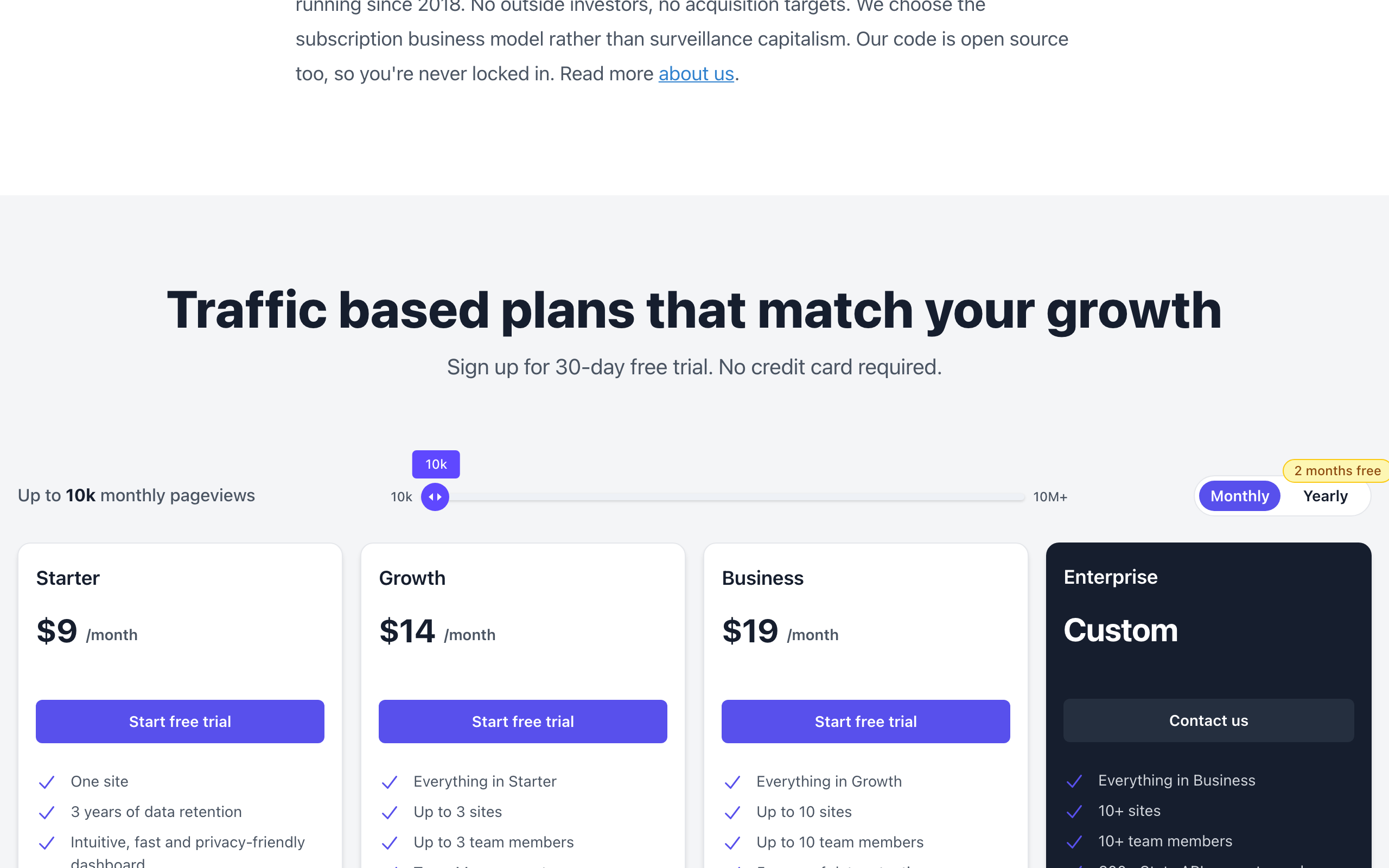
The part that actually decides it is on the pricing page. Starter is $9 a month at 10,000 monthly pageviews, 1 site, and 3 years of data retention. Growth is $14 for 3 sites and 3 team members. Business is $19 for 10 sites and 5 years of retention. There is a 30 day trial with no card, and paying yearly gives you 2 months free.
Read those 2 paragraphs against each other. The free tool keeps your detail for 14 months. The $9 tool keeps it for 3 years, and the $19 tool for 5. That inverts how most people frame this choice, which is usually "do I pay for prettier". You are not paying for prettier. You are paying for a longer memory, on a bill that follows your traffic, so a viral month costs more than a quiet one.
Pick it when you are honestly never running a paid ad, when the question is only ever "what did people read this week", and when you would rather not put a banner in front of your own visitors. Do not pick it if you need ad attribution, user level paths, or cohorts. It will not do those, and it is not pretending to.
The free ones nobody mentions
Cloudflare Web Analytics is the one to know about. It is free on every plan, and the docs describe it as privacy first analytics for your website "without changing DNS or using Cloudflare proxy", so it is 1 script tag even if your site is hosted elsewhere. No cookies, so no banner for it. It will not tell you anything about conversion, and that is the point: it is the free second read that tells you whether traffic moved, without you logging into the thing you dread.
Umami is open source and free if you run it yourself, on your own database, on your own box. That sentence contains the whole trade. Nobody who wanted fewer tools ever finished the year happy about adding a server to maintain, so take this one only if self hosting is already a hobby.
PostHog is priced generously, free for the first 1 million events a month and then $0.00005 an event at the 1 to 2 million tier, and it is still the wrong tool for most people here. It is product analytics: session replays, funnels, feature flags, built for software with logged in users. Putting it on a blog is buying a workshop to hang a picture.
Fathom does Plausible's job and does it well. Its pricing page opens on $45 a month for up to 500,000 pageviews, with a 7 day trial. If you are running that kind of traffic it is worth the look. If you are at 4,000 pageviews a month, Plausible's $9 is the same job for a fifth of the money.
What I actually run
On luxrise.io, GA4, because that site exists to send people to an App Store listing and I need to know which page did it. The outbound links carry a token on the end so an install can be traced back to the click that caused it, which is not something a cookieless tool can answer. The analytics took about 10 minutes. The consent banner, done properly with a region split default, took the rest of the afternoon, and that ratio is normal.
On sites that exist only to be read, the free Cloudflare read is enough, and I have never once wished it were deeper. That is the honest shape of this category for most solo founders: 1 property that is properly configured, sometimes a free second opinion, and no monthly invoice. If you get to the point where the 14 months genuinely hurts and you have not turned on the export, that is your signal to pay Plausible $9, not to go shopping.
The tool nobody names in this category is the spreadsheet you check once a month. Analytics that nobody opens is not free, it is just a cost you stopped noticing.
The call
The best website analytics tool for a solo founder in 2026 is GA4, on the free tier, with retention set to 14 months in the first 10 minutes and 3 key events marked. It is free at any traffic level and it is the only option here that connects a paid click to a sale.
Buy Plausible at $9 a month when you are certain the ad attribution will never matter and you would rather have 3 years of clean history on 1 screen than 14 months in an interface you avoid. Add Cloudflare Web Analytics free alongside either. Skip the rest until something specific breaks.
The best website analytics tool in 2026 is GA4, free at any traffic level, because it is the only one on this page that ties a Google ad click to a sale and feeds Search Console and YouTube into the same property. Install it, then change 1 setting: data retention, from the default up to 14 months, because that is the longest a free property will keep your user and event level data before deleting it. If you are never going to run an ad and you want the number without the interface, Plausible at $9 a month is the 1 real exception, and the thing you are buying is not simplicity, it is 3 years of retention instead of 14 months. Everything else here is either free and thinner (Cloudflare Web Analytics) or solving a different problem (PostHog).
Honest FAQ
What is the best website analytics tool in 2026?
GA4, for almost everyone. It is free at any traffic level with no pageview cap, and it is the only tool in this category that reports Google Ads conversions, Search Console queries and YouTube into the same property. The exception is a content site that will never run a paid ad, where Plausible at $9 a month gives you 1 readable screen, no cookie banner, and 3 years of data retention instead of 14 months.
Is Google Analytics still free in 2026?
Yes, and free means free at any traffic level, not free up to a limit. The paid tier is Analytics 360, which is quoted for enterprises rather than listed on a pricing page. What the free tier costs you is data retention: user and event level data is kept for 2 or 14 months, and 26 month retention is a 360 only option.
How long does Google Analytics keep my data?
In a free property, user and event level data is retained for either 2 months or 14 months, whichever you select, and 14 months is the maximum. Aggregate reporting over longer date ranges keeps working, but the detail that Explorations and path analysis run on is deleted. Change the setting to 14 months on day 1, because it does not apply retroactively.
Do I need a cookie banner for Google Analytics?
If you have visitors in the UK, the EEA or Switzerland, yes, because GA4 sets cookies and those regions require consent before you store anything. Everywhere else you can default to on and offer a way out. The correct setup is a region split default rather than 1 global setting, and under Consent Mode a denied visitor still sends cookieless pings, so you keep counting traffic even when people say no.
Is Plausible worth $9 a month when GA4 is free?
It is worth it if you value 2 things GA4 will not give you: a dashboard you actually open, and 3 years of retention on the cheapest plan against GA4's 14 months. It is not worth it if you run any paid advertising, because Plausible cannot do ad attribution or user level paths, and that gap costs more than $9 a month the first time you spend on ads without knowing what converted.
Can I run Google Analytics and Plausible at the same time?
You can, and plenty of people do, but the 2 will disagree by 10% or more because they count differently and one of them is blocked more often than the other. Run both only if you have a reason, such as wanting a cookieless number that survives consent denials. If you just want a free second read, Cloudflare Web Analytics costs nothing and answers the same question.