ClickUp Alternatives (2026): You Probably Don't Need One.
The best ClickUp alternative for a solo founder is a plain doc plus an AI agent. For teams of 3+ shipping software, it's Linear. Here's the honest breakdown.
- Solo founder: run your week from one plain doc and put an AI agent on the actual work. You review outcomes instead of updating statuses, and project management goes back to about 10 minutes a week.
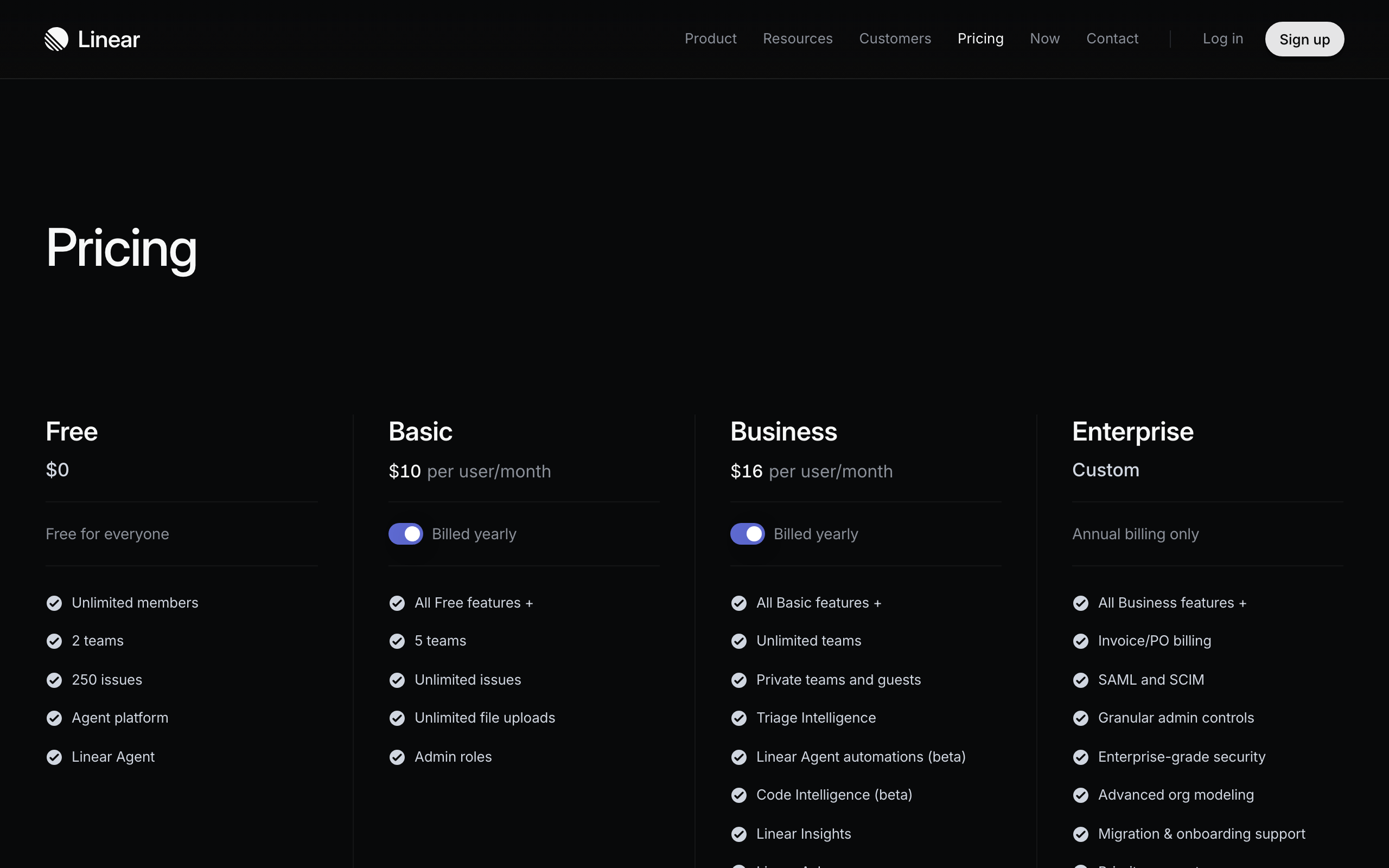
- Team of 3+ shipping software: Linear, $10/user/mo on annual billing. The only PM tool on this page I'd pay for.
- Notion is not a ClickUp alternative. Never Notion.
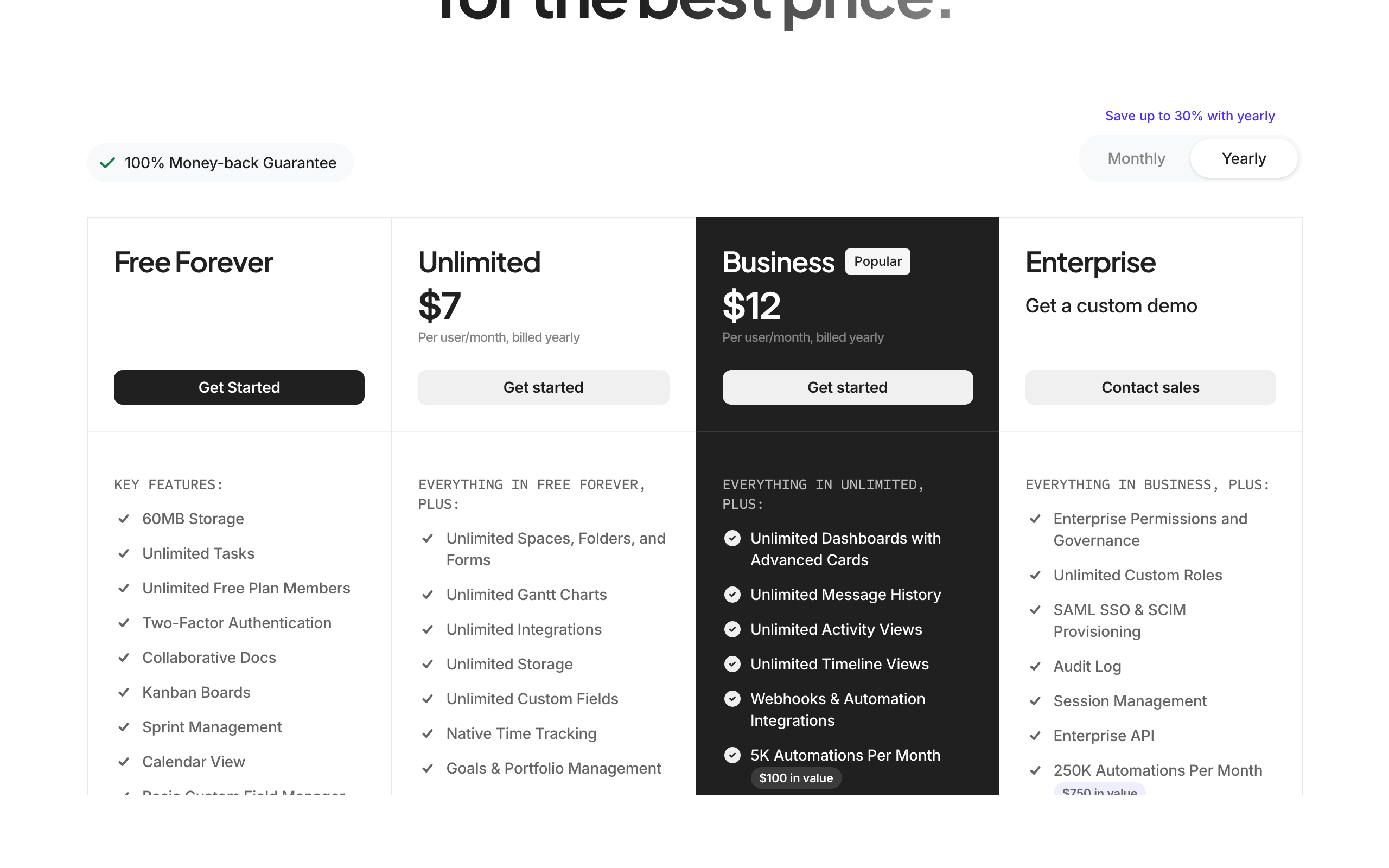
- ClickUp itself is fine for ops-heavy teams of 10+ that genuinely use the feature buffet.
Why you're searching for ClickUp alternatives
ClickUp promised one app to replace them all. What you got is one app that contains them all. Docs, whiteboards, goals, sprints, chat, forms, dashboards, time tracking, all stacked inside a project manager you opened to check 3 tasks.
If you're a solo founder, the pattern is usually this: you spent a weekend building the perfect workspace, and now you spend Sunday nights updating statuses so the dashboard looks how your week felt. That's not managing projects. That's doing admin for an app. You pay from around $7 a month for the privilege, and the free tier isn't free either, it costs you the same attention.
ClickUp is built for teams that need 15 features and a manager who wants one login. It's genuinely fine at that job. But most people typing "ClickUp alternatives" into Google aren't that team. They're 1 or 2 people who feel slower since they installed it.
The current way: a doc plus an AI agent
Here's what replaced ClickUp for me and what I'd set up today if I were starting over.
Your task list lives in one plain doc. This week's priorities at the top, a running backlog below, done items struck through. An AI agent (I use Claude, from free to ~$20/mo) reads the doc, does the research, drafts the copy, chases the loose ends, and updates the doc when it's done. You review outcomes, not statuses.
The uncomfortable realization: the boards, sprints, and dashboards were only ever there to coordinate other people. When the other people are agents, the structure shrinks back down to a list. I ran ClickUp for 2 years. The "project management" part of my week is now about 10 minutes, and nothing has fallen through that a kanban column would have caught.
Who can ignore this: if your work is coordinating humans (clients, contractors, a team), you still need a shared tool, and that's what the table below is for.
| Option | Price | One-line call | Who it's for |
|---|---|---|---|
| Doc + AI agent | $0-20/mo | The current way. Less admin, more done. | Solo founders, teams of 1-2 |
| Linear | Free; $10/user/mo | Fast, opinionated, says no to features. The one to pay for. | Software teams of 3+ |
| Notion | Free; $10/user/mo | Never Notion. A wiki you'll over-build instead of a PM you over-built. | Not this job |
| Keep ClickUp | Free; $7/user/mo | Fine if you actually use the buffet. | Ops-heavy teams of 10+ |
Linear: the ClickUp alternative worth paying for
If you have an actual team shipping software, Linear is the answer, and it's the opposite philosophy to ClickUp. Where ClickUp adds a feature for every request, Linear says no. Issues, cycles, a roadmap, keyboard-fast, and nothing else. Nobody builds a second brain inside Linear because there's nowhere to build it, and that's the point.
Linear's free tier covers 2 teams and 250 issues, which is more runway than most small teams expect. After that it's $10 per user per month on the Basic plan, billed annually, and $16 on Business (current pricing here). Worth saying plainly: that is more than ClickUp's $7 Unlimited seat. You are not switching to Linear to save money. You are paying a few dollars more per seat to get a tool that refuses to grow into the thing you're currently escaping.
What you give up is real. No docs product, no forms, no time tracking, no client portal. Pair it with one doc tool, not 5. And Linear is opinionated about how software teams work, in cycles, with issues that have owners. If your team's work is client services or content rather than shipping product, that shape will fight you and you'll end up bending it back into a ClickUp.
Notion: never Notion
House rule, and this page is not the exception. Notion is not a project management tool, it's a database kit that lets you build one, which means the weekend you lost to configuring ClickUp becomes a month of building your own.
The AI story has also moved in a direction worth knowing before you commit. As of August 2026, Notion AI is a limited trial on Free, Plus and Business, with full access sitting at Enterprise, and the Custom Agents run on credits at $10 per 1,000 monthly credits on top of your seat (current pricing). So the pitch that Notion is where your AI and your tasks finally live together costs $10 a month for the seat plus a metered bill you can't forecast. That's a strange trade when the agent you already pay for reads a plain file for free.
The people who thrive in Notion enjoy building systems more than running them. If that's you, you know it, and no take of mine will stop you. Everyone else: never Notion.
What the doc does worse
Every page recommending this setup skips the next four paragraphs, so here they are.
A doc does not remind you of anything. ClickUp pings you about the thing due Thursday. A plain file sits there in silence and lets you forget. In the first fortnight after I moved I missed 2 small deadlines that ClickUp would have caught. The fix was boring: a recurring Monday calendar block to read the doc top to bottom, and the agent posting the week's list into the chat I actually open.
You lose the audit trail. If a client asks when something was marked done, ClickUp has the answer and your doc does not. Bill hourly, or work anywhere with a compliance requirement, and that alone is a reason to stay.
You lose shared status. Nobody can see what you're doing without you telling them. Solo, that's a feature. With even one contractor it becomes a message you now write every day.
Recurring tasks are the genuinely annoying one. ClickUp regenerates them and a doc does not, so anything monthly has to move to a calendar.
None of that is nothing. Call it a week of feeling slower and an hour of setup. I still think it's the right trade for one person, because what you get back is the entire maintenance layer. But if you read that list and your stomach dropped, you're not who this page is for, and that's a legitimate answer rather than a failure.
The other move: the ClickUp you already have records video
There's a version of this where ClickUp stays and earns its seat properly, and I think it's badly underrated.
ClickUp's Free Forever plan includes in-app video recording. Not a trial, it's on the free tier (verified August 2026). If you already have ClickUp open all day and you send async video to your team, use that recorder. The clip lands attached to the task it's about, the person watching is already looking at the task, and it's one window instead of two. For internal team video that is the better shape, and it's the reason I stopped opening a separate recorder for it.
The catch is real and I'd rather say it than have you find out. It is not the same product. Loom starts recording faster, sharing is one click, and the viewer page is nicer. In ClickUp there are a few more steps and the clip wants to live attached to something. The first week you will notice every one of those extra clicks.
Then you get used to it. That's the whole trick, and it's the part nobody selling you software says out loud. The better setup usually loses not because it's worse but because it's different, and different is uncomfortable for about a week. The same thing happened with this site, which has no CMS to upload into any more. That felt wrong for a fortnight and now the old way seems mad.
So before you move off ClickUp, check the other direction. Open the plan you already pay for and write down what it does that you're currently doing somewhere else. If that list is longer than your reasons for leaving, the better move is to stay and use it properly. (If the video is going to customers rather than your team, that's a different job, and it belongs to a real editor rather than either of these.)
When you should just keep ClickUp
Fair is fair. Keep ClickUp if you're an ops-heavy team of 10 or more that actually uses the spread: forms feeding tasks, dashboards a manager reads weekly, time tracking that hits invoices. At ~$7 per user per month it undercuts buying those tools separately, and consolidation is a real saving at that size (current pricing). The tool was never the problem. The problem is one person running enterprise software to manage their own to-do list.
The call
Most people reading a ClickUp alternatives page don't need any of the alternatives. Run one doc, put an agent on the actual work, and get your Sunday night back. The exception: 3 or more humans shipping software together should pay for Linear and skip the rest. Notion is a trap door. That's the whole list.
The best ClickUp alternative for a solo founder is not another project management app. It's a plain doc plus an AI agent, and for teams of 3 or more shipping software, it's Linear. That's the whole answer. The rest of this page is why, what each option costs, and who should ignore me.
Honest FAQ
Is ClickUp worth it for one person?
No. Solo, you spend more time updating ClickUp than it saves you. A single doc plus an AI agent covers planning and does the work itself. ClickUp earns its seat price when several humans need one shared source of truth, not before.
What's the best free ClickUp alternative?
A doc you already have. Google Docs, Apple Notes, a markdown file, it genuinely doesn't matter. Pair it with a free-tier AI agent. If you want a free tool with structure for a small team, Linear's free tier beats ClickUp's because there's less to configure.
Is Notion a good replacement for ClickUp?
No. You'd be trading an over-featured project manager for a build-it-yourself database kit. Same weekend lost to setup, different logo. If heavyweight structure is truly needed, you already had it in ClickUp.
How do I move off ClickUp without losing my tasks?
Export to CSV (Settings, then Import/Export), keep only the open tasks, paste this week's into a doc and archive the rest. Don't migrate your whole history into the next tool. The backlog you haven't touched in 6 months is not coming with you for a reason.
Can AI really replace a project management tool?
For one person, mostly yes. The PM tool's job was tracking work between humans. An agent doesn't need tracking, it needs the doc with your priorities, and then it does the work and reports back. What AI doesn't replace is coordination between multiple humans, which is why teams still get Linear.
Can ClickUp replace Loom?
For internal team video, yes, and it's on the free tier. ClickUp's Free Forever plan includes in-app video recording, so the clip lands attached to the task it's about, in the tool your team already has open. It is not a like for like swap. Loom starts recording faster and its share flow is one click, where ClickUp wants the clip attached to a task or doc. Give it a week before you judge it. For video going out to customers rather than your own team, use an actual editor instead.