Calendly Alternatives (2026): Cal.com, Then Stop Looking.
The best Calendly alternative is Cal.com: free for individuals with the features Calendly charges $10/mo for, open source, and yours. Full honest breakdown.
- Cal.com free covers what Calendly charges ~$10/mo for: unlimited event types, integrations, routing basics. Switching saves $120 a year.
- It's open source and self-hostable, so your booking link can't be taken hostage by a pricing change.
- Already on Google Workspace? Calendar's built-in appointment schedules are free and fine for simple one-type booking.
- Keep Calendly only if your company runs on its enterprise routing and admin, and someone else pays for it.
- The move is an afternoon: connect calendar, rebuild event types, swap the link in your bio and email signature.
Why you're searching for Calendly alternatives
Because at some point you noticed what the subscription actually buys: a page with your free times on it. Calendly built the category, popularized the share-a-link ritual, and earned years of default status. Then the free tier stayed capped at one event type while the useful version settled at around $10 a month, and $120 a year started feeling like a lot of rent for a link that shows when you're not busy.
It is. The booking link is a solved problem in 2026. The technology hasn't moved in years, which is exactly when a subscription stops being justified and starts being a habit. This is one of the cleanest cancels on this site because the replacement isn't a compromise you learn to live with. It's the same feature list with a $0 on it.
Cal.com: the same product, free, and yours
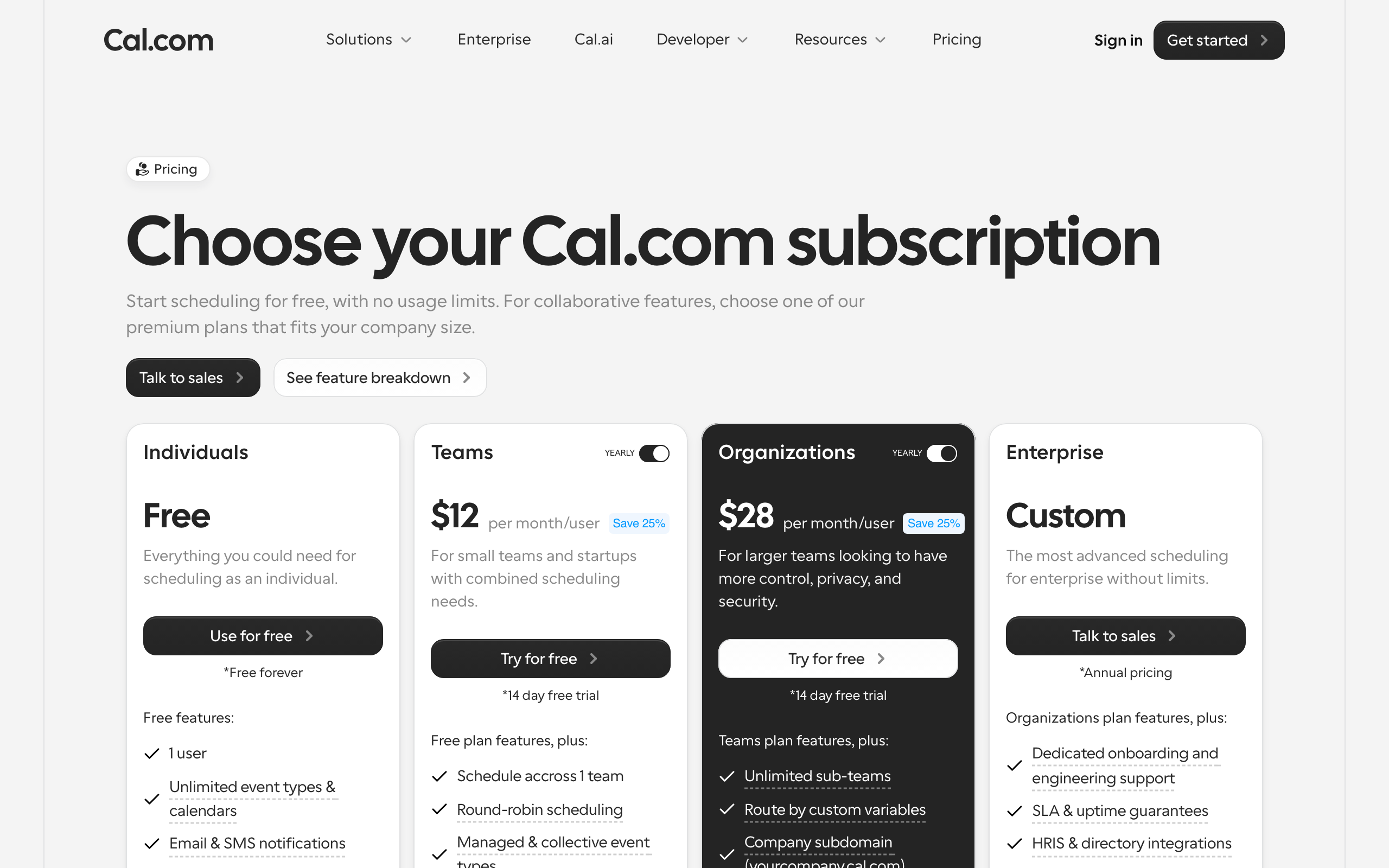
Cal.com is what it looks like when someone rebuilds Calendly as open source infrastructure instead of a SaaS funnel. The individual plan is free and includes the things Calendly makes you pay for: unlimited event types, calendar connections, Zoom and Meet hookups, buffers, limits, custom questions. Teams pay $12 per user for round-robin, collective events, and routing (pricing here).
The open source part sounds ideological until you translate it: the code is public, you can self-host the whole thing on your own server if you ever need to, and no pricing committee can ever hold your booking flow hostage. You will probably never self-host. Knowing you could changes the relationship, the same reason the Stack prefers ownable tools wherever one exists at parity.
I moved my own link over in an afternoon. Setup is the same ritual as Calendly (connect calendar, define event types, set availability), the booking page is clean, and nobody who books with me noticed anything except the URL. That's the whole review: it's the same, and it's free.
| Option | Price | One-line call | Who it's for |
|---|---|---|---|
| Cal.com | Free; $12/user teams | Calendly's paid tier, for free, and you can own it. The pick. | Individuals, founders, small teams |
| Google appointment schedules | $0 with Workspace | Built into the calendar you already pay for. Fine for simple. | One booking type, zero new tools |
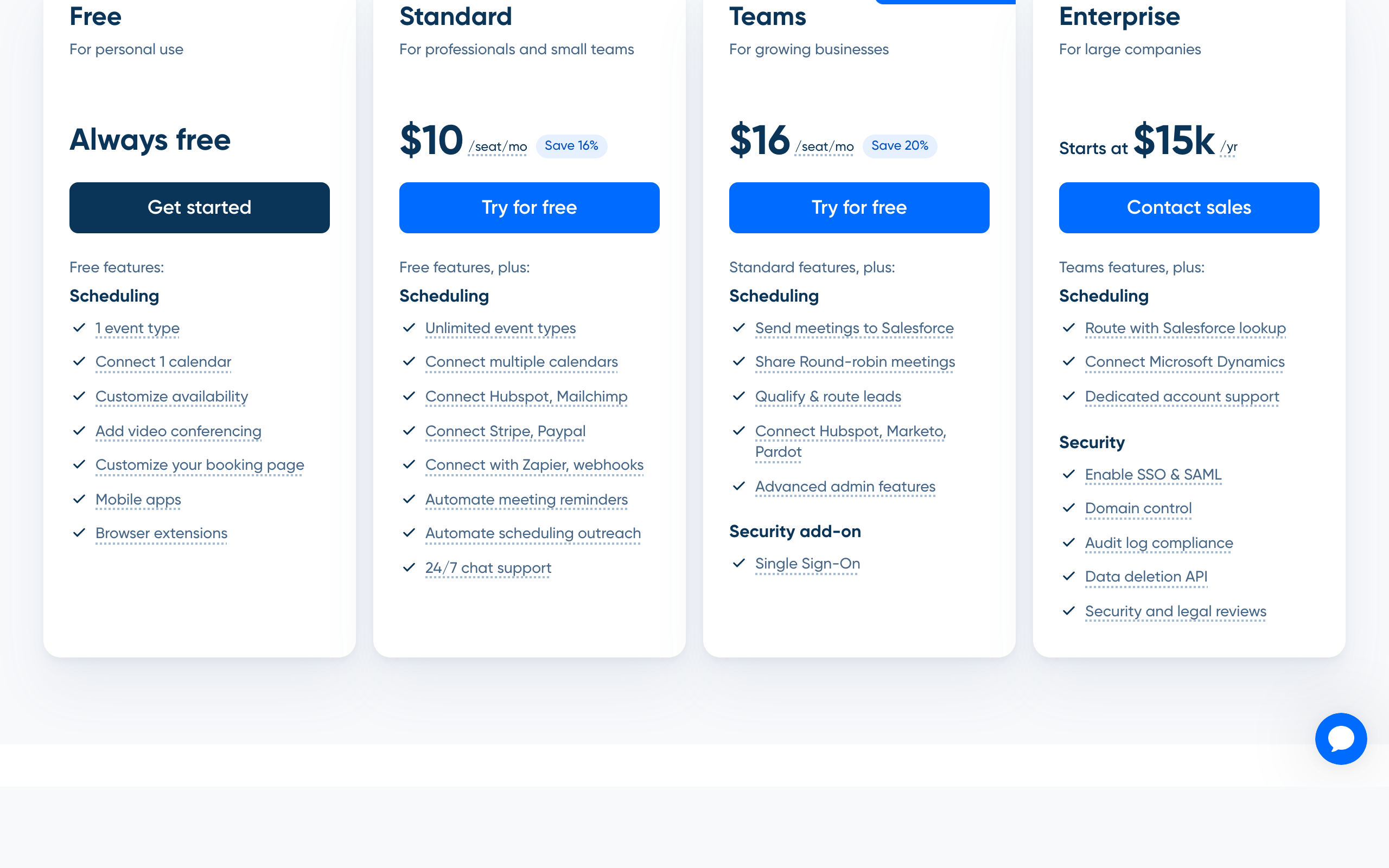
| Keep Calendly | Free 1 event type; ~$10/mo | Still works. You're just paying rent on a link. | Companies deep in enterprise routing |
| No booking link | $0 | 3 emails per meeting. The false economy. | People who take 2 calls a month |
The free option you already own: Google appointment schedules
Before paying anyone, check the tool you already have. Google Workspace includes appointment schedules directly in Calendar: pick your available hours, get a booking page, bookings land as events with Meet links attached. No new account, no new tab, nothing to cancel later.
The honest limits: it's one flavor of booking, thin on customization, no routing, no payments, and the booking page looks like Google made it (they did). But if your entire need is "clients can grab 30 minutes with me," this is the correct amount of tool, which is to say no new tool at all. The best tool is often the one already inside a thing you pay for.
When Calendly is still the right answer
Fair section. Calendly's enterprise layer is real: lead routing from marketing forms, Salesforce handoffs, admin policies across hundreds of sales reps, the analytics a revenue ops team asks for. Companies at that size aren't buying a booking link, they're buying a scheduling department, and Calendly is genuinely good at being one.
If that's your employer, keep it, it was never your $10 anyway. But notice that none of it describes a founder with a discovery-call link in their bio. The features you'd actually use are the ones Cal.com gives away. Paying Calendly as a solo operator is subsidizing an enterprise product you'll never see the inside of.
Making the switch without losing bookings
The move is an afternoon, and most of it is find-and-replace. Sign up at Cal.com, connect the same calendar, and rebuild your event types (you'll have 2 or 3, they take minutes each). Set the same buffers and limits. Then hunt down the old link: bio, email signature, website contact page, any automations that send it (mine was hiding in a Flodesk welcome email, which took longer to find than the whole Cal.com setup took).
Keep the Calendly account alive for 2 weeks so stragglers with the old link still land somewhere, existing scheduled meetings stay on your calendar regardless. Then cancel. Nothing else on this one, it really is that boring, which is the point.
The call
The best Calendly alternative is Cal.com, then stop looking. Same features, free where Calendly charges ~$10 a month, open source so it can never be taken hostage, $12 a seat when a team materializes. If even a signup is more tool than the job deserves, Google Calendar's appointment schedules are already in your Workspace bill. Keep Calendly only if an enterprise revenue team, and its budget, made the choice for you. Saved: $120 a year and nothing else, because nothing else changes. That's what a solved problem should cost.
The best Calendly alternative is Cal.com, and for most people it isn't a trade-off, it's the same product for less. Free for individuals with unlimited event types (which Calendly gates behind its ~$10 a month tier), open source, self-hostable if you ever care, and $12 per user when a team joins. A booking link is a solved problem. You shouldn't be renting the solution.
Honest FAQ
Is Cal.com really free?
Yes, for individuals, and it isn't a crippled trial: unlimited event types, calendar integrations, buffers, and custom questions are all on the free plan. Teams pay $12 per user per month for round-robin, collective scheduling, and routing. Self-hosting the open source version is also free.
What's the catch with Cal.com vs Calendly?
For a solo user, functionally none, the day-to-day product is at parity and the money flows the other way. Calendly pulls ahead in enterprise territory: mature lead routing, Salesforce workflows, and admin controls for large sales teams. If those words don't describe your week, there's no catch.
Does Google Calendar have a free Calendly alternative built in?
Yes. Appointment schedules in Google Calendar give you a booking page tied to your availability, with Meet links on every booking. It's simple (one booking flavor, minimal customization) but it's free with Workspace and requires no new tool. For basic 30-minute-call booking it's enough.
How do I switch from Calendly to Cal.com?
Connect the same calendar in Cal.com, recreate your event types and buffers (minutes each), then replace the old link everywhere it lives: bio, signature, website, and any automated emails. Keep Calendly active for 2 weeks for stragglers, then cancel. Existing booked meetings stay on your calendar.
Is Calendly worth paying for in 2026?
For individuals, no. The ~$10 a month tier buys features Cal.com ships free, and the booking link itself is solved technology. Paying makes sense only at enterprise scale, where routing, CRM handoffs, and admin controls are the actual product being bought, usually by a company, not a person.